
In build, coming soon

IndustryCRMs,
readytorent.

CRM software built around how your industry actually runs, with quotes, invoicing, payments and your own branded app included. Rent it monthly and deal directly with the developer who built it.

  • Built for your industry
  • Custom branded app included
  • Quotes, invoicing and payments
  • Quick set up
  • Local, fast support

Why we are doing this

Custom-built CRMs,
now ready to rent.

Veleria is a custom software studio in Melbourne. We have spent the last year building CRMs from scratch for real Australian businesses, and the same problems kept coming up in every industry.

So we are turning the best of that work into ready-made industry CRMs you can rent monthly. You get software shaped around how your industry runs, without paying for a full custom build, and you still deal directly with the developer who wrote it.

Meet the studio
  1. 01

    Built from real jobs

    Every CRM starts from software we have already built and run with a working business in that industry. Not a template with new labels.

  2. 02

    Rented, not rebuilt

    Pay monthly instead of paying for a custom build up front. The heavy lifting is already done.

  3. 03

    Made yours

    Your logo, colours, services and pricing throughout, plus a custom branded app for your customers.

  4. 04

    Custom when you need it

    Need something your industry version does not do? We wrote the code, so we can build it in.

Coming soon

For pressure washing and exterior cleaning businesses

Pressure Washing CRM

Quote by the square metre. Book around the weather. Get paid on the day.

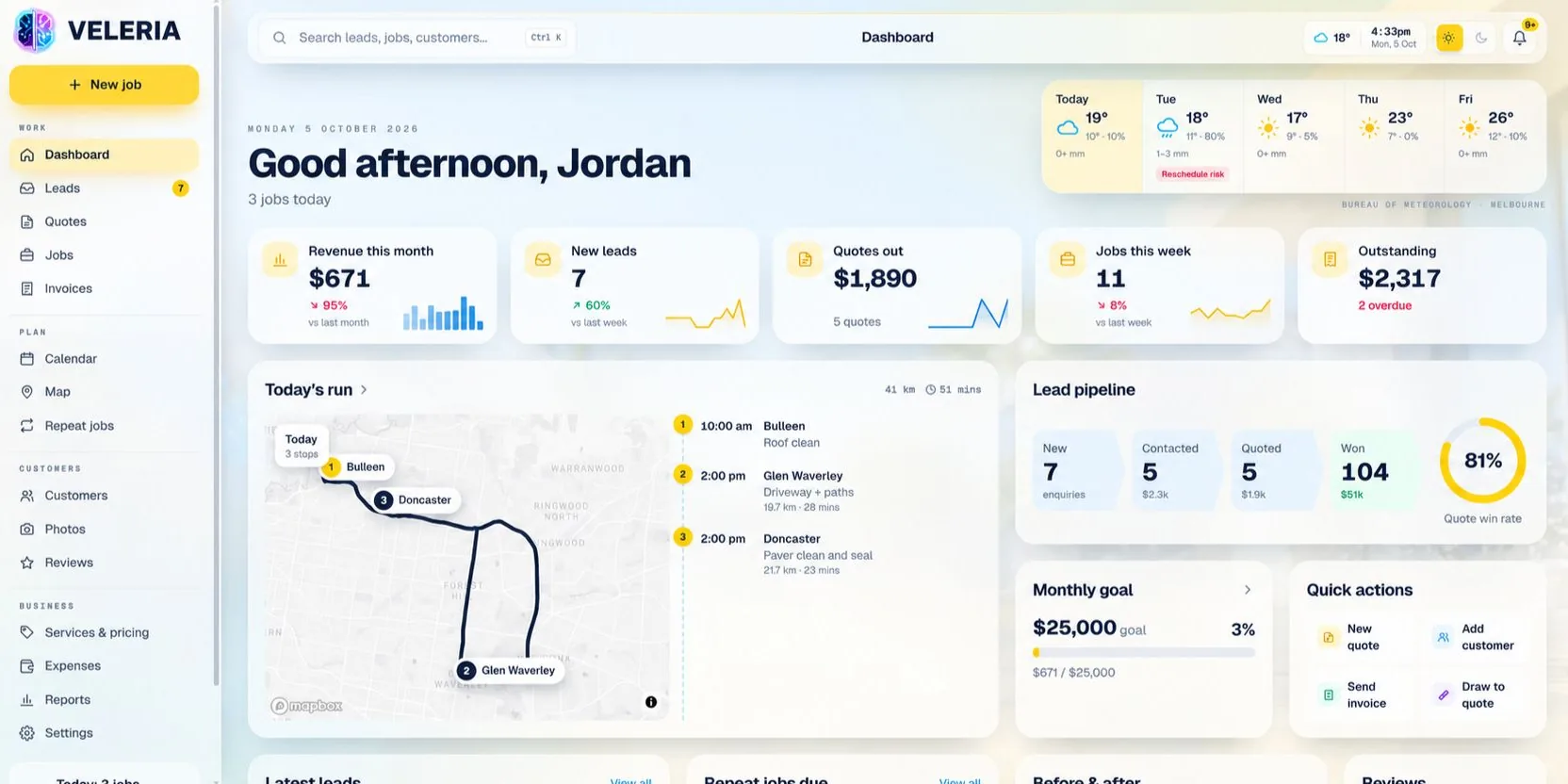
Built with a working pressure washing business, so it handles the parts generic job software skips: pricing by surface, rain delays, photo proof and the repeat customers who come back every year.
Get early access

Everything in the build

Pressure Washing CRM

Everything a pressure washing or exterior cleaning business runs on, in one place.

51features
across 9 areas

Leads and enquiries

05
  • Quote request formA form for your website that drops straight into the CRM.
  • Lead pipelineNew, contacted, quoted and won, with values at each stage.
  • Lead source trackingSee which jobs came from Google, Facebook or referrals.
  • Instant auto-replyNew enquiries get an answer while you are on the tools.
  • Follow-up remindersNudges so no enquiry goes cold.

Quoting

09
  • Quote by surface and m²Driveways, roofs, house washes, decks, paths, solar and gutters.
  • Draw to quoteMeasure areas on a satellite map and price them instantly.
  • Service price listYour rates per m², minimum charges and call-out fees.
  • Add-ons and upsellsSealing, soft wash treatments, mould and stain removal.
  • Good, better, best optionsGive customers choices on one quote.
  • Online acceptanceCustomers accept and sign from their phone.
  • Deposits on acceptanceTake a deposit the moment a quote is accepted.
  • Quote follow-upsAutomatic reminders for quotes that have not been answered.
  • Branded PDF quotesYour logo, colours and terms on every quote.

Scheduling and weather

07
  • Day and week calendarEvery job and crew at a glance.
  • 5-day forecast on the dashboardRain chance and totals beside your bookings.
  • Reschedule risk flagsJobs on wet days are flagged before they become a problem.
  • Bulk rain rescheduleMove a rained-out day in one go and customers are told.
  • Today's runJobs in driving order with total kilometres and drive time.
  • Crew assignmentPut the right crew on the right job.
  • Repeat jobsRecurring cleans scheduled automatically.

On site

06
  • Crew mobile appToday’s jobs, addresses and notes in the crew’s pocket.
  • Site notesTap location, gate codes, pets and access instructions.
  • Before and after photosTaken on site and attached to the job automatically.
  • On my way messagesCustomers get a text when the crew is heading over.
  • Job checklistsEvery surface and step ticked off before leaving.
  • Customer sign-offSignature on completion, stored with the job.

Customers and repeat work

06
  • Customer and property recordsSaved surfaces and measurements for next time.
  • Job history per propertyWhat was cleaned, when, and what it cost.
  • Repeat clean remindersCustomers nudged when their annual clean is due.
  • Photo galleryEvery before and after, organised by customer.
  • Review requestsAsk for a Google review once the job is done.
  • Tags and notesCommercial, strata, VIP or anything you like.

Invoicing and payments

06
  • Invoice from the jobOne tap when the job is finished.
  • Card payment linksCustomers pay online the same day.
  • GST-ready invoicesYour ABN and GST shown correctly every time.
  • Overdue remindersAutomatic and polite, so you are not chasing.
  • Outstanding at a glanceWhat is owed and what is overdue, on the dashboard.
  • ExpensesFuel, chemicals and equipment logged against the business.

Dashboard and reporting

04
  • Live dashboardRevenue, new leads, quotes out, jobs this week and outstanding.
  • Monthly goal trackerSet a revenue target and watch progress.
  • Quote win rateHow many of your quotes turn into jobs.
  • ReportsRevenue by service, suburb and month.

Your brand

04
  • Custom branded appYour name and logo, not ours.
  • Branded quotes, invoices and emailsConsistent with your business everywhere.
  • Client portalCustomers view quotes, invoices and job photos.
  • Light and dark modeEasy on the eyes at 6am and 6pm.

Setup and support

04
  • Data importCustomers and jobs moved across from your current system.
  • Setup with youServices, prices and branding configured together.
  • Local supportMelbourne based, talk to the developer who built it.
  • Feature requestsNeed something added? Ask the person who writes the code.

Coming soon.Early businesses help shape the first release.

app.veleria.com.au
Pressure Washing CRM by Veleria, dashboard preview

What it does

Made for the way you work.

Six things generic job software makes you work around.

Quotes by surface and area

Driveways, roofs, house washes, decks and solar panels, each with its own rate per square metre.

Weather rescheduling

Move a rained-out day in one go and the customers are told automatically.

Before and after photos

Taken on site, attached to the job and sent with the invoice.

Repeat work reminders

Customers get a nudge when their annual roof or driveway clean is due.

Day route for the crew

Jobs ordered by suburb so the ute is not crossing the city twice.

Invoices and payments

Card payment links, deposits and overdue reminders without chasing.

Built for
Pressure washingSoft washingRoof cleaningWindow and gutter cleaningSolar panel cleaning
Coming soon

A Tradify alternative for Australian tradies

Trades CRM

Job management for tradies, built and supported by the developer you can call.

Quotes, jobs, scheduling, timesheets and invoicing in one place, with your branding and a client portal included. If you are on Tradify now, we move your clients and jobs across for you.
Get early access

Everything in the build

Trades CRM

Quotes, jobs, crews and cash flow for Australian tradies. A Tradify alternative.

51features
across 10 areas

Enquiries and sales

05
  • Enquiry inboxEvery web, phone and email enquiry in one list.
  • ConsultationsBook and track initial consults with new customers.
  • Site visitsSchedule measure-ups and record what you found.
  • Sales pipelineOpen quotes and their total value at a glance.
  • RemindersFollow-ups and callbacks that do not rely on memory.

Quoting and estimating

08
  • Price listsYour labour rates and materials, kept up to date.
  • KitsBundle materials and labour you quote together, priced in one click.
  • Quote templatesStart common jobs from a ready-made template.
  • Markup and marginSee profit on every line before you send.
  • Options and variationsOffer choices and price changes as the job evolves.
  • Signed on siteCustomers accept and sign from a phone.
  • DepositsRequest a deposit on acceptance.
  • Quote to job in one clickAccepted quotes become jobs with nothing retyped.

Jobs

06
  • Job cardsNumbered jobs with everything about the work in one place.
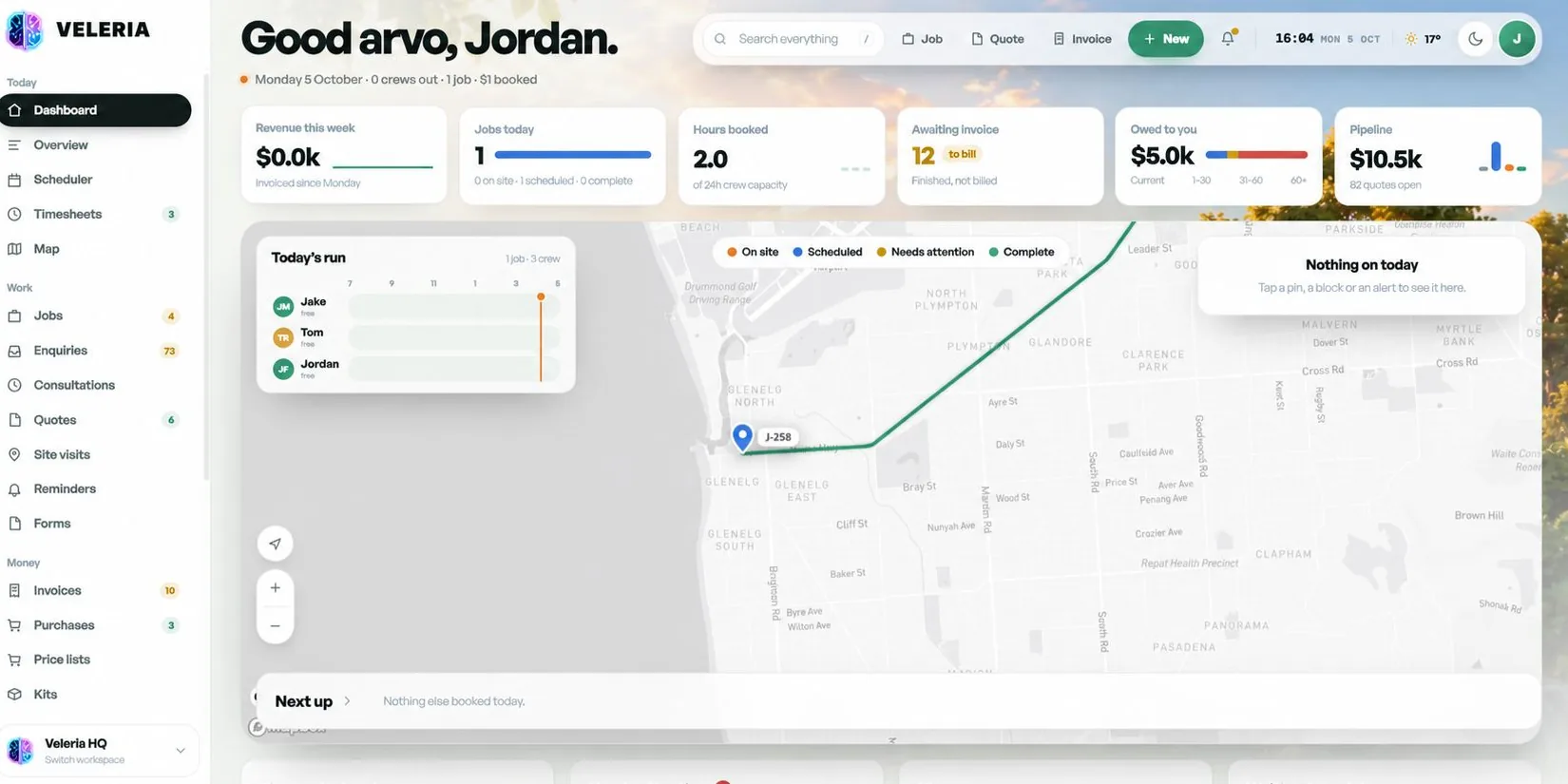
  • Live job statusOn site, scheduled, needs attention and complete.
  • Multi-visit jobsJobs that span days, stages or trades.
  • Job costingActual hours and materials against what you quoted.
  • Files and plansDrawings, photos and documents attached to the job.
  • Needs attention alertsJobs that are stuck or overdue get flagged.

Scheduling and dispatch

05
  • Crew schedulerDrag jobs onto crews and everyone sees the change.
  • Crew capacityHours booked against what each crew can handle.
  • Live job mapEvery job on the map, coloured by status.
  • Today's runEach crew’s day on a timeline, with what is next.
  • Crew notificationsNew and changed jobs pushed to the right people.

Field team

06
  • Crew mobile appJobs, addresses, notes and files on site.
  • TimesheetsClock on and off against each job.
  • Photos and notesProgress captured and attached as the work happens.
  • Forms and checklistsSWMS, JSAs, inspections and your own custom forms.
  • Compliance certificatesCompleted and stored against the job.
  • Customer sign-offSignature on completion.

Purchasing and materials

03
  • Purchase ordersSend POs to suppliers straight from a job.
  • Materials on jobsParts used logged against the job they belong to.
  • Supplier pricingKeep supplier costs in your price lists.

Invoicing and cash flow

06
  • Awaiting invoice listFinished jobs that have not been billed yet.
  • Progress invoicingBill in stages on bigger jobs.
  • Owed to you ageingCurrent, 1 to 30, 31 to 60 and 60+ days.
  • Card payment linksGet paid online, often the same day.
  • Overdue remindersSent automatically so you do not have to chase.
  • GST-ready invoicesYour ABN and GST shown correctly.

Customers and portal

04
  • Client portalCustomers approve quotes, pay invoices and see progress.
  • Customer and site historyEvery job and site for each customer.
  • Service remindersAnnual services and inspections, prompted automatically.
  • Review requestsAsk for a Google review when the job is done.

Dashboard and reporting

03
  • Live dashboardRevenue, jobs today, hours booked, owed and pipeline.
  • Job profitabilityWhich jobs and job types actually make money.
  • Crew utilisationBooked hours against capacity, by crew.

Your brand and setup

05
  • Custom branded appYour business name and logo throughout.
  • Move from TradifyClients, jobs and price lists imported during setup.
  • Setup with youRates, kits and templates configured together.
  • Local supportMelbourne based, talk to the developer who built it.
  • Feature requestsNeed something your trade does differently? We build it in.

Coming soon.Early businesses help shape the first release.

app.veleria.com.au
Trades CRM by Veleria, dashboard preview

What it does

Made for the way you work.

Six things generic job software makes you work around.

Quotes and variations

Build quotes from your price list and get them signed on site from a phone.

Scheduling and dispatch

Drag jobs onto your crew calendar and everyone sees the change straight away.

Timesheets and materials

Hours and parts logged against each job, so every job shows its real margin.

Certificates and forms

Compliance certificates, SWMS and checklists attached to the job they belong to.

Client portal

Customers approve quotes, pay invoices and see job progress without calling.

Move from Tradify

We import your clients, jobs and price list during setup.

Built for
ElectriciansPlumbersCarpenters and buildersHVAC and refrigerationLandscapers

Getting started

From your old system to running in the new one.

  1. 01

    Register interest

    Tell us your trade and what you use now. Early businesses help shape the first release.

  2. 02

    We set it up with you

    Your clients, jobs and price list imported, your branding added, your team walked through it.

  3. 03

    Run your business

    Pay monthly. Questions and feature requests go straight to the developer who built it.

Next up

More industries coming soon.

These are on the drawing board. The ones with the most interest get built next, so if yours is here, or missing, let us know.

Vote for your industry
  • Cleaning CRM

    Coming soon

    For example: Recurring cleans, room checklists and contracts billed monthly.

  • Beauty and salons CRM

    Coming soon

    For example: Bookings by stylist, client notes, memberships and rebooking.

  • Legal CRM

    Coming soon

    For example: Matters, document checklists and time recorded straight to invoices.

  • Office admin CRM

    Coming soon

    For example: One shared inbox for calls, emails and forms, with tasks assigned.

  • Automotive CRM

    Coming soon

    For example: Vehicle history, service reminders and parts on each job.

  • Aged care CRM

    Coming soon

    For example: Care notes, rostering, visit logs and updates for families.

  • Childcare CRM

    Coming soon

    For example: Enrolments, attendance, waitlists and messages to parents.

  • Accounting CRM

    Coming soon

    For example: Onboarding, document requests and recurring work by deadline.

  • Education and tutoring CRM

    Coming soon

    For example: Student bookings, term billing and progress notes.

  • Landscaping CRM

    Coming soon

    For example: Maintenance rounds, seasonal quotes and crew scheduling.

  • Pest control CRM

    Coming soon

    For example: Treatment records, warranty dates and annual reminders.

  • Removalists CRM

    Coming soon

    For example: Inventory quotes, truck allocation and move-day checklists.

Questions

CRM questions.

Something not covered? Call 0478 333 107 or email contact@veleria.com.au.

When will the Pressure Washing CRM and Trades CRM launch?

Both are in build now. Register your interest and we will contact you when yours is ready. Early businesses get a say in what goes into the first release.

Is the Trades CRM a replacement for Tradify?

It covers the same core work: quotes, jobs, scheduling, timesheets and invoicing. The difference is that it is built and supported by Veleria directly, carries your branding, includes a client portal, and new features can be requested from the person who builds them. It is not affiliated with Tradify.

Can I move my data across from Tradify or spreadsheets?

Yes. During setup we import your clients, jobs and price list from Tradify exports, spreadsheets or most other job management tools.

What makes the Pressure Washing CRM different from general job software?

It is designed around how pressure washing businesses actually quote and work: rates per square metre by surface, rescheduling around rain, before and after photos sent with the invoice, and reminders for repeat annual cleans.

How do I pay for it?

Both CRMs are rented on a monthly subscription. There is no large upfront build cost, and setup is done with you.

Can my customers log in?

Yes. Each CRM includes a client portal where customers can approve quotes, pay invoices and check on their job.

My industry is not listed. Can I still get a CRM?

Tell us how your business runs. Industries with the most interest get built next, and Veleria also builds fully custom CRMs for businesses that need one now.

Who supports it?

Veleria does. The developer who built it is the person you deal with, based in Melbourne and working with businesses across Australia.

Get in before launch.

Register now and we'll call you when your CRM is ready. Need something today? We still build fully custom CRMs.

Fully insured. Rated 5.0/5 on Google. Melbourne based, Australia wide.